Join over 20.000 users. Try it free for 10 days

CRM + Business Management

Scan your expenses and stay in control from your CRM

Upload receipts and supplier invoices, mark their payment status and view the income vs. expenses balance from the financial dashboard.

  • ✓Upload receipts and supplier invoices
  • ✓Mark the payment status of each expense
  • ✓View the income vs. expenses balance from the financial dashboard
From €12 /month
✓ 10-day trial ✓ No credit card required ✓ Support in Spanish
Expense management in wiwink

Save time by automating the recording of your expenses

Scan and you're done.

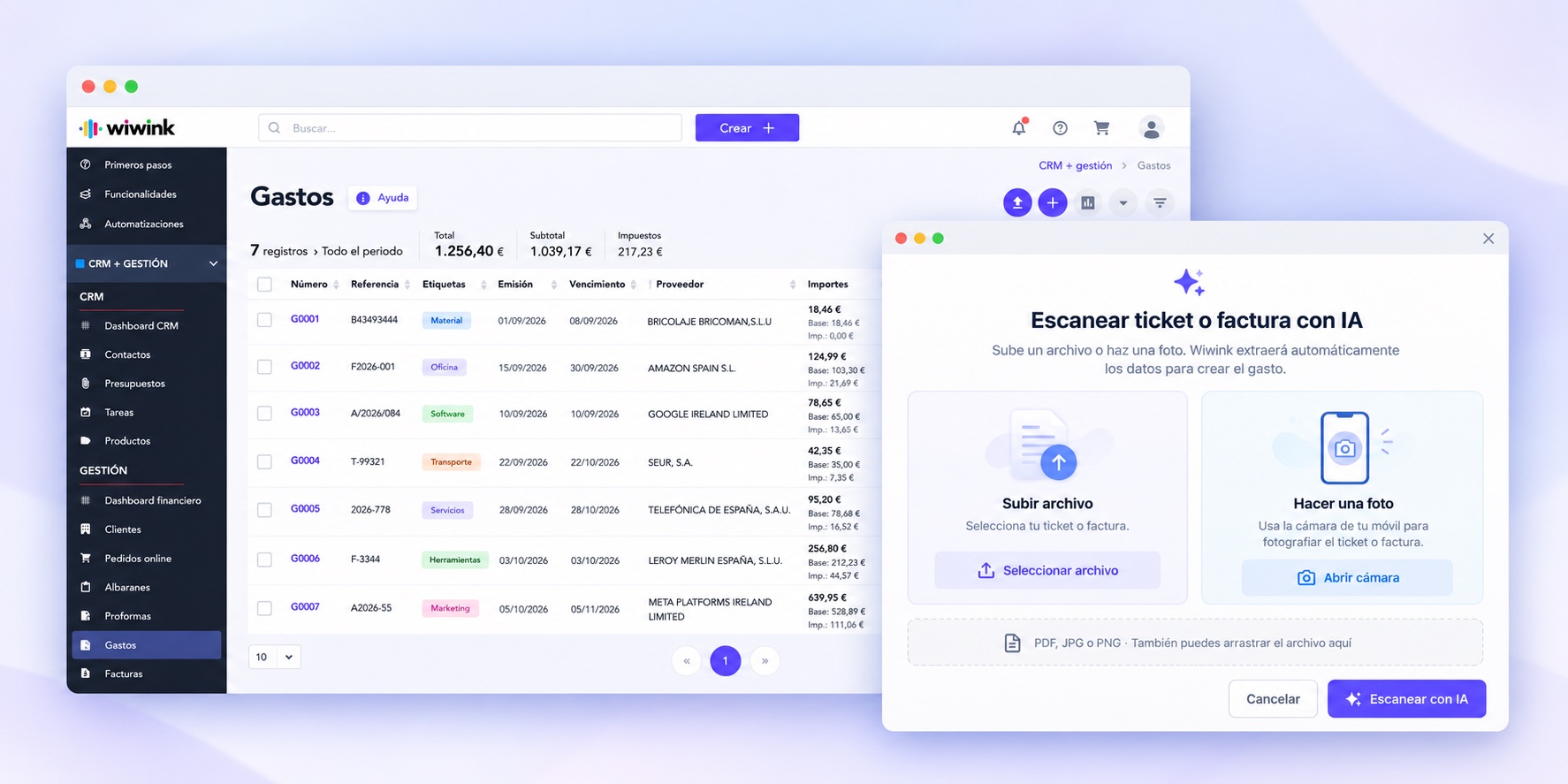
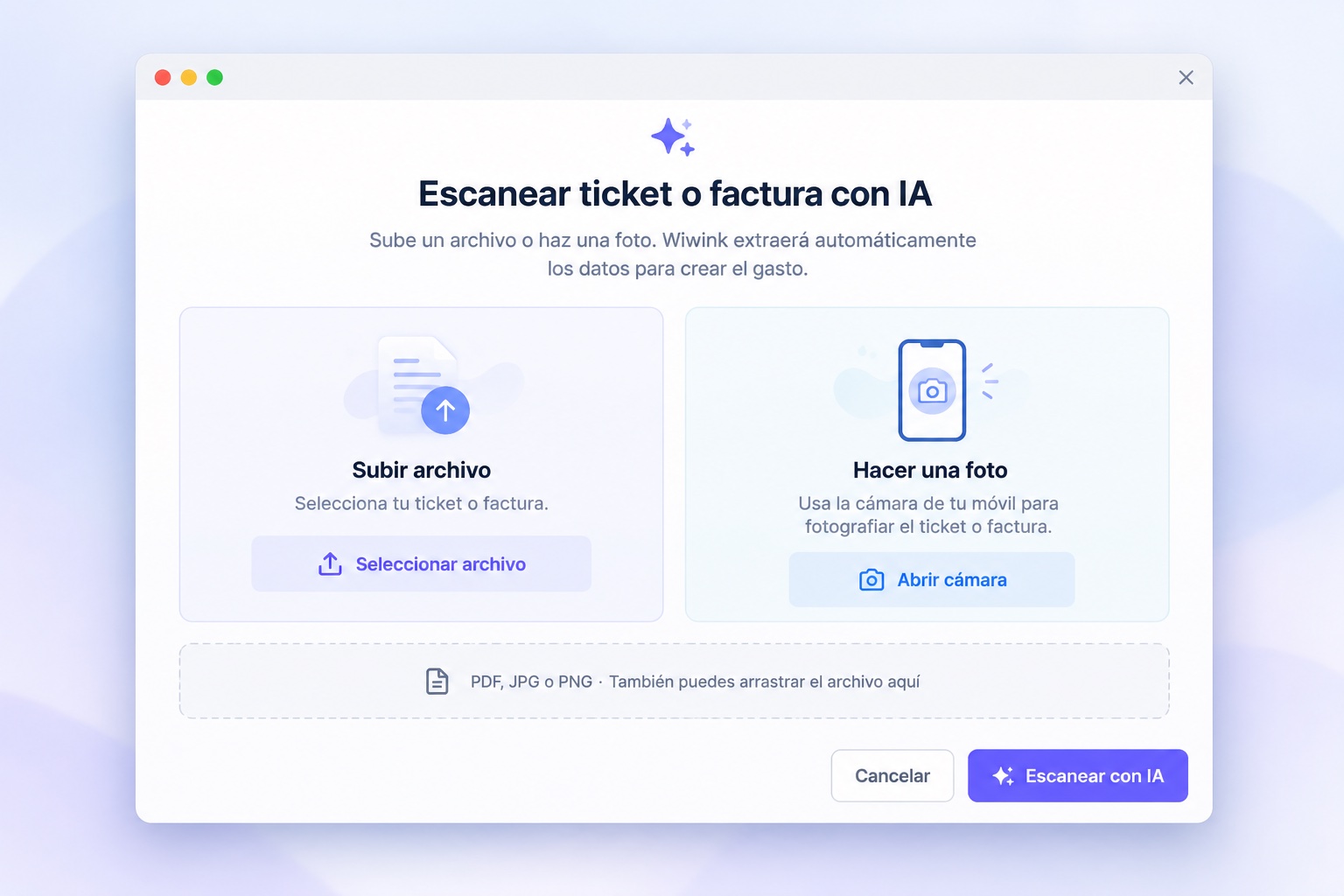
Upload the PDF and the AI extracts supplier, amount, dates and taxes.

Without leaving wiwink.

Record, attach and categorise every expense from the same CRM.

Check the status instantly.

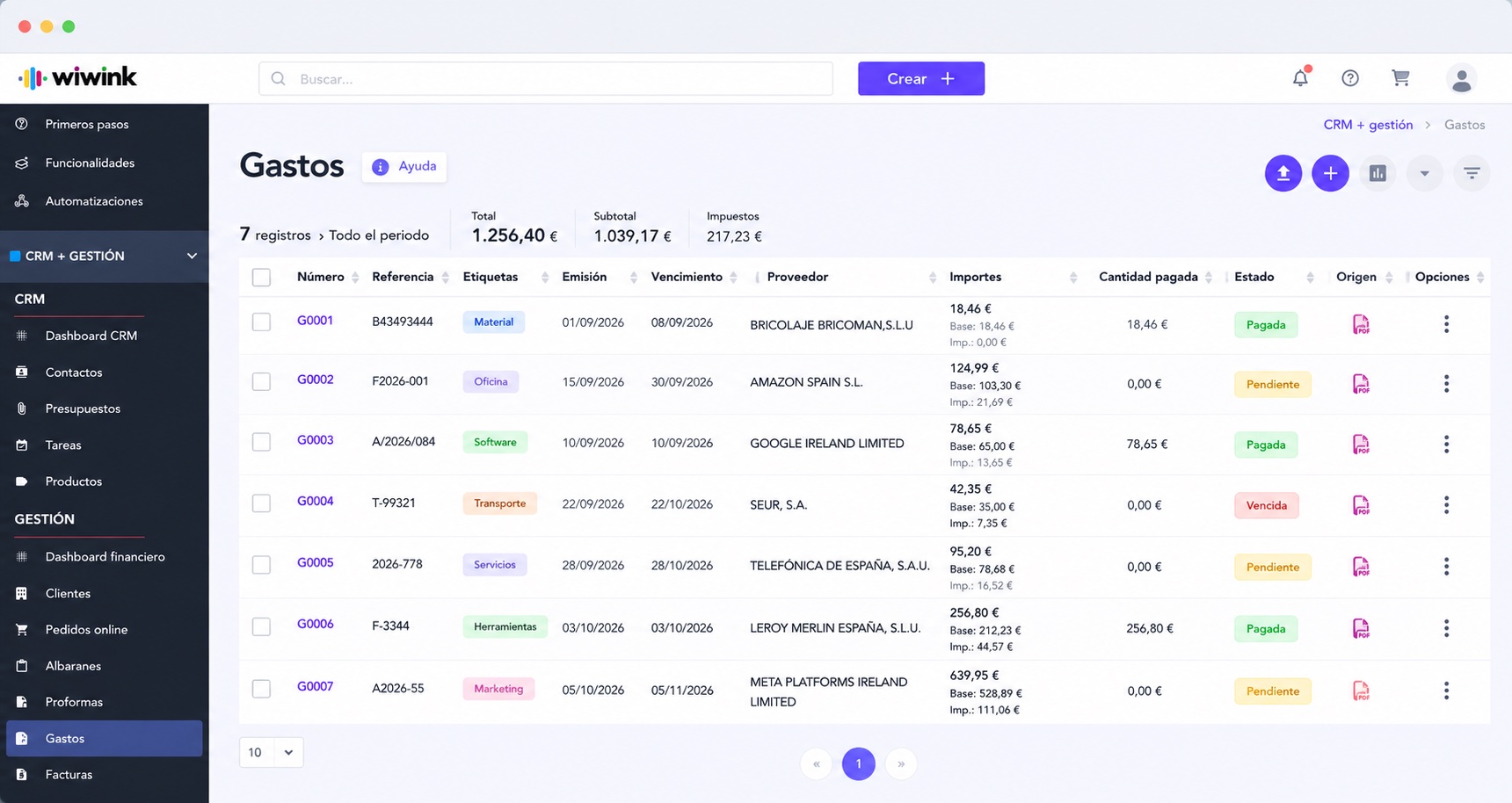
Pending or paid, with issue and due dates at a glance.

Everything connected to the supplier.

Quickly access each supplier's purchase history.

Keep control of your expenses without leaving wiwink

Expense management is part of the CRM + Business Management module, included in every wiwink plan at no extra cost.

Expense management

Included in CRM + Business Management

Unlimited expense scanner included in CRM + Business Management: upload receipts and supplier invoices and wiwink extracts the data for you.

Includes
AI expense scanning No extra cost on top of your CRM + Business Management Export to Excel

Expense scanning

Upload the PDF and wiwink fills in the expense for you

Upload a receipt or supplier invoice as a PDF and wiwink's AI analyses the document and extracts the data automatically.

  • Upload the invoice or proof of purchase as a PDF
  • wiwink analyses the document with AI
  • Extracts supplier, date, amount, taxable base, taxes and invoice number
  • Creates the expense automatically, with no manual data entry
Expense scanning in wiwink

Expense management and control

Every expense, with its status and supplier at a glance

Record, attach and categorise your expenses, track due dates and check the income and expenses balance from the financial dashboard.

  • Expense records with PDF or image attachments
  • Classification by status: pending payment or paid
  • Issue and due dates, with quick follow-up
  • Expenses linked to their supplier, with purchase history
  • Income vs. expenses balance from the financial dashboard
  • Export expenses to Excel
Discover e-invoicing →
Expense management in wiwink

Your whole business connected, at every step.

⚡Adapt the workflow to your sector
Marketing Hub CRM + Business Management + Verifactu Digital signature Schedule control Works Loyalty Automation
1Connect web or API
2Manage the client
3Sign quotes and contracts
4Control your team
5Organise the work
6Invoice and get paid
7Keep your clients loyal
8Automate tasks

Adapt wiwink to your business

Pay annually and save 20% on CRM, modules and users

Enable JavaScript to calculate modules and users. Base prices and sign-up links remain available.

Basic
CRM + Business Management Verifactu
1 user included
Basic does not include modules: for Schedule control or Works users, choose Adapta or Pro.
CRM · Boost your sales
  • ✓Contacts
  • ✓Quotes
  • ✓Tasks
  • ✓Products and services
Management · Save time and money
  • ✓Verifactu
  • ✓Electronic invoicing
  • ✓Clients and suppliers
  • ✓Automatic invoicing
  • ✓Bank remittances and online payments
  • ✓Client portal
  • ✓Suppliers
Find out more about what CRM + Business Management covers ▾
  • ✓Delivery notes
  • ✓Proforma
  • ✓Expenses · scanning
Includes
  • ✓Unlimited invoices per year
  • ✓Unlimited recurring invoices
  • ✓Custom roles
  • ✓Documents (100 GB)
From15€/month
CRM + Business Management
Start for free
★ Recommended
Adapta
Choose your modules or sector
2 users included
Basic CRM + Business Management Verifactu
(Included in your Adapta plan)
€15/month
Schedule control €10/month ▾
  • ✓Schedule control
  • ✓Absences and holidays
  • ✓Geolocation
  • ✓Employee documents
Digital signature €10/month ▾
  • ✓Simple signature
  • ✓Biometric signature
  • ✓SMS verification
  • ✓100 signatures/month included
Loyalty €10/month ▾
  • ✓Ticketing and incidents
  • ✓Satisfaction surveys
  • ✓10,000 sends/month
Marketing Hub €10/month ▾
  • ✓Forms and REST API
  • ✓Zapier and Meta Lead Ads
  • ✓Email marketing
  • ✓10,000 sends/month
Works €10/month ▾
  • ✓Work reports
  • ✓Technician scheduling
  • ✓Control checklist
Automations Free ▾
  • ✓Connect your modules and automate tasks and processes
Choose your sector or a module to see the price
Start for free
Pro
All modules included
3 users included
Basic CRM + Business Management Verifactu
(Included in your Pro plan)
€15/month
Schedule control €10/month ▾
  • ✓Schedule control
  • ✓Absences and holidays
  • ✓Geolocation
  • ✓Employee documents
Digital signature €10/month ▾
  • ✓Simple signature
  • ✓Biometric signature
  • ✓SMS verification
  • ✓100 signatures/month included
Loyalty €10/month ▾
  • ✓Ticketing and incidents
  • ✓Satisfaction surveys
  • ✓10,000 sends/month
Marketing Hub €10/month ▾
  • ✓Forms and REST API
  • ✓Zapier and Meta Lead Ads
  • ✓Email marketing
  • ✓10,000 sends/month
Works €10/month ▾
  • ✓Work reports
  • ✓Technician scheduling
  • ✓Control checklist
Automations Free ▾
  • ✓Connect your modules and automate tasks and processes
From49€/month
All modules included
Start for free

Connect with your favourite tools

The wiwink core and every module integrate with the tools your business already uses — without relying on external integrations to work.

Stripe PayPal Zoom Google Calendar Google Meet Google Contacts Microsoft Teams Calendly WooCommerce WordPress Zapier

Everything you can achieve with wiwink

Every benefit comes from combining the wiwink core with the modules you choose, so it fits your business model.

Win clients
Track sales, assign tasks, send quotes and sign digital contracts, all from the wiwink CRM.
Find out more →
Save time
Automate repetitive tasks, avoid duplicating data and enable online payment with a single click from your invoices.
Find out more →
Centralise your information
From the client record, access quotes, invoices, signed documents, purchased products and more, all in one place.
Find out more →
Build client loyalty
Segment your database and send campaigns or surveys, or manage issues without leaving wiwink.
Find out more →
Stay in control of your business
Check income, expenses, pending payments and best-selling products, and manage your team with real-time data.
Find out more →
Stay compliant
Generate FacturaE, comply with Verifactu, send GDPR-compliant campaigns and sign documents with legal traceability.
Find out more →

Frequently asked questions

We answer the most common questions about expense management in wiwink.

What is a CRM with expense management?
A CRM with expense management is a tool that lets you record, organise and review your company's expenses in the same environment where you manage clients, quotes, invoices and suppliers.
How are expenses recorded in wiwink?
Expenses can be recorded manually by entering the relevant information, or by importing an invoice or proof of purchase as a PDF.
Can I attach invoices or proofs of purchase to expenses?
Yes. wiwink lets you attach invoices and proofs of purchase to each expense to keep all your documentation organised and accessible.
Can I see the balance between income and expenses?
Yes. The information recorded in wiwink lets you view the evolution of income and expenses from the financial dashboard.
Can wiwink read a PDF invoice automatically?
Yes. wiwink can analyse invoices and proofs of purchase in PDF format to speed up expense recording.
Can I import expenses from a PDF invoice?
Yes. From the expenses section you can import an invoice or proof of purchase as a PDF to create a new expense.
Can I link an expense to a supplier?
Yes. All expenses can be linked to a supplier.
What information can I record on an expense?
Each expense can include information such as supplier, amount, issue and due dates, status, reference, expense type, taxes, discounts and associated documents.
What statuses can an expense have in wiwink?
Expenses can be classified by status to make them easier to follow up. You can currently mark an expense as pending payment or paid.
Can I check which expenses are pending payment?
Yes. wiwink makes it easy to identify expenses pending payment by their status.
Is expense management included in the CRM + Business Management module?
Yes. Expense management is part of the wiwink CRM + Business Management module.
Can I export my expenses to Excel?
Yes. The data recorded in the expenses module can be exported to Excel.

Stop chasing receipts and start scanning them

No card, no commitment: try wiwink free for 10 days.